
410 Mk5 Peristaltic Pump Operating Instructions

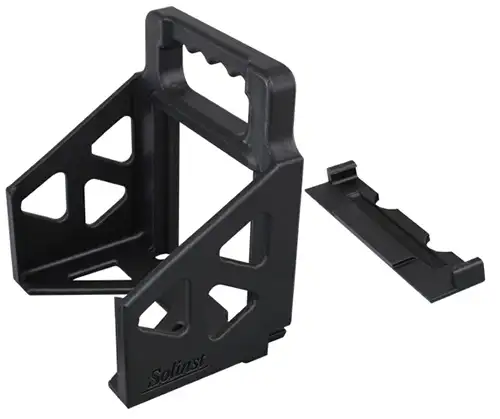
Optional Peristaltic Pump Battery Holder
(part number 114602)
Solinst Model 410 Peristaltic Pump
(part number 117665)
- 3 m (10 ft) Power Cable
- DrawDown Link Cable Connection
- Pump Status LED
- 10A Reset Button
- Forward/Reverse Dial
- Handle
- 5/8 Inch Silicone Tubing
- Thumbscrews
- Pump Head
Powering the Peristaltic Pump
The Solinst Model 410 Peristaltic Pump operates from an external 12V DC power supply such as a car, truck or marine 12 volt battery that can supply at least 3–5 amps at maximum draw. The pump has a 3 m (10 ft) power cable with connector clips for direct battery connection.
For more portable, short duration sampling events, attach the optional 12V Battery Holder (see separate instructions).
The power cable clips are oversized for use with automotive batteries. The red clip connects to the positive (+) battery terminal, black to negative (-) battery terminal. If the battery is connected with reverse polarity the pump will not be harmed, but it will NOT operate until the polarity is connected correctly (the LED on the Pump will remain off with reverse polarity).
A circuit breaker reset button is located on the side of the pump. In the event the pump amperage exceeds 10 amps, the circuit breaker will trip (button pops out) and turn the pump off. To reset the breaker, simply press the reset button back in to regain operation of the pump.
If the pump is to be powered by a typical 45Ah vehicle battery for more than 3 continuous hours, start vehicle and run for 15 minutes to recharge the battery.
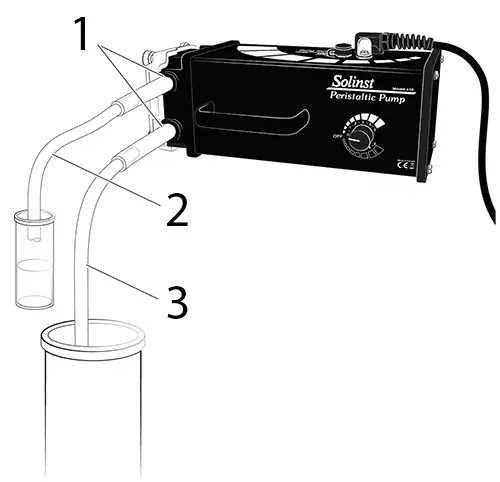
Solinst Model 410 Peristaltic Pump Setup
- Pump Head Tubing (5/8 inch or 3/8 inch)
- Extra tubing may be connected, or the sample can just discharge out of the pump head tubing
- Down-hole Tubing (1/2 inch or 12/4 inch)
Note:
Down-hole tubing is inserted inside the pump head tubing by about 25 mm (1 inch). The friction-fit holds the tubing together.
IMPORTANT
- To avoid misuse, refer to the LED status indicator light
- The pump should be operated in an upright position, sitting on the rubber feet on the bottom of the pump (handle and dial on top).
- Pump is water resistant but not waterproof. Do not submerge in water.
- Pump is not designed for long-term continuous uninterrupted use.
- To avoid motor damage due to over-heating, allow pump to cool fully at least every 7–8 hours, or more often under high ambient heat conditions.
- Pumping rates and suction lift will decrease with elevation, and as the amount of lift increases.
- Replace the tubing regularly. Worn tubing can cause the pump to be inefficient. This will show as a limited ability to lift water. If the tubing looks worn, flattened or cracked, replace the tubing.
- If used in cold weather, ensure that there is no ice in the tubing before starting the pump.
Peristaltic Pump Operation
- The Solinst Peristaltic Pump has an integral forward/reverse, variable flow dial with an OFF position, which has a central detent. When turning the unit OFF, ensure you feel the dial snap into position.
- The pump should always be kept with the control in the OFF position when it is being attached to a power source or stored.
- Once attached to a power source, turn the dial in the direction required and adjust the flow as desired.
- The standard 5/8″ (16 mm) OD medical grade silicone tubing can be attached to 1/2″ (13 mm) OD down-hole sample tubing and gives sample rates up to 3.2 L/min.
- The 3/8″ (10 mm) OD silicone tubing and adaptor kit allows the use of 1/4″ (6 mm) OD down-hole sample tubing, giving sampling rates as low as 40 mL/min.
- Ensure that the chosen silicone tubing has been properly installed in the pump head.
- Connect one end of the silicone tubing to the down-hole sample line. See diagram below.
- Either connect the other end of the silicone tubing to a discharge tube, or simply discharge out of this end of the tubing. See diagram below.
- Connect the negative (black) battery clip to the negative terminal post on a 12V DC battery and the positive (red) battery clip to the positive terminal.
- Turn the dial in the direction required and adjust the flow as desired.
Solinst MK5 Peristaltic Pump LED Indicator Status











Slow: 1 flash per second Fast: 4 flashes per second
Down-hole Tubing Specifications
(Use with Standard 5/8 inch OD Silicon Tubing)
Down-hole Tubing Specifications
(Use with Optional 3/8 inch OD Silicon Tubing with Adaptor Kit)
Troubleshooting
If the pump fails to work, please try the following:
- Ensure that the 12V battery is fully charged.
- Ensure the alligator clips are connected correctly to the 12V battery. Black clip is negative. Red clip is positive. (LED lights
and pump will remain off with reverse polarity). - Ensure the wires to each alligator clip are not broken/ damaged. Slide back the red and black plastic insulating covers and look for any damage.
- Has the Circuit Breaker tripped (reset button popped out on side of pump)? If so, simply press the reset button to regain operation of the pump.
- Check the LED lights to see if they are indicating high or low battery voltage.
- Remove the pump head cover and the silicone tubing. Any physical damage anywhere? Use new silicone tubing.
- A fast flashing red LED indicates an electrical continuity issue. Check voltage and all connections.
- See the Peristaltic Pump Repair and Service Guide for more troubleshooting options
Note:
All “Red” LED faults require the pump to be turned off, wait 10 seconds, and turn it back on to clear the indicator.
Peristalic Pump Maintenance
- Remove tubing when stored.
- Replace the tubing regularly.
- To avoid motor damage due to over-heating, allow pump to cool fully at least every 7–8 hours, or more often under high ambient heat conditions.
- In the event of a tripped circuit breaker, simply press the reset button on the side of the pump to regain operation of the pump.
- With heavy usage we recommend opening the motor to inspect the gears periodically. Clean the gears and add grease if necessary. Contact Solinst for instructions.
Note:
Always disconnect from the power source while the pump head cover is removed.
Changing or Installing 5/8 inch Silicone Tubing
(Part Number 105137)
- To install or replace the tubing, disconnect the pump from its power supply, then undo the four thumbscrews on the pump head
(clear plastic end). Remove the pump head cover. - Manually rotate the pump impeller in any direction while gently pulling on the tubing to pull it out of the pump head.
- Position the new tubing around the impeller in a “U” shape with equal lengths. Turn the impeller to the 6 and 12 o’clock position and push the right hand tubing into the tubing pathway, holding near the bottom. Rotate the impeller clockwise until tubing is in
place. Push the left half of the tubing into place and rotate the impeller. - Reposition the pump head cover and screw firmly in place, but only finger tight. Do not use a wrench or over tighten.
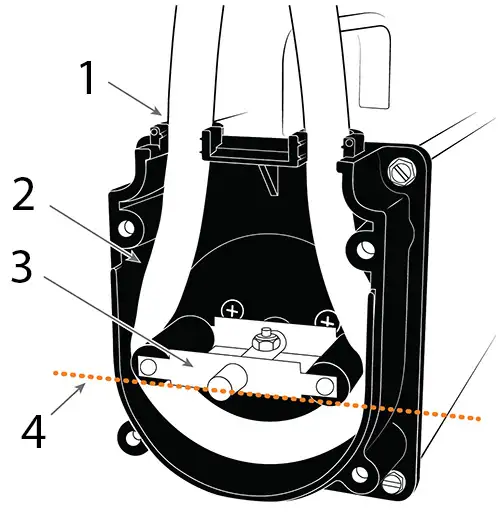
Changing Solinst Peristaltic Pump Tubing:
- Tubing Inlet / Outlet
- Tubing Pathway
- Impeller
- Rotate until both sides of the tubing are pinched by the impeller
Installing Adaptor Kit and 5/8 inch Tubing
(Part Number 113913)
Kit Includes:
- 3 ft of 3/8″ OD Silicone Tubing
- 1 HDPE Pump Head Insert
- 2 Tubing Inserts
Silicone Tubing and Tubing Inserts

HDPE Pump Head Insert
- Disconnect the pump from the power supply, then undo the four thumbscrews on the pump head (clear plastic end). Remove the pump head cover. Remove the existing tubing (see step #2 above).
- Slide the tubing inserts into the pump head tubing inlet/outlets.
- Make a “U” shape with the white plastic pump head insert and place around the tubing pathway in the pump head. The angled cutouts on the two corners of the insert face outwards.
- Position the new tubing around the impeller, following instruction #3 above.
- Re-position the pump head cover and screw it firmly in place, but only finger tight. Do not use a wrench or over tighten.

Peristaltic Pump with Tubing Adaptor Kit Installed:
- Tubing inserts
- 3/8 inch OD Silicone Tubing
- Pump Head Insert
Adding Tubing Drop Weight
(Part Number 116913)
Includes: 7/8 inch OD Stainless Steel 0.8 lbs Weight with 50 mesh Filter
- Insert the tubing barbs at the top of the weight into the down-hole tubing. The tubing barbs work with 1/2″ or 1/4″ down-hole tubing.
- The weight will be held in place by friction-fit.

Drawdown Operation
When connected to a Solinst Model 101D Water Level DrawDown Meter, the pumping process can be automatically controlled based on the water level detected by the 101D Water Level DrawDown Meter. For example, the Peristaltic Pump will stop when a specified drawdown level is reached and pumping will restart once the water level has recovered.
Requires:
- Mk5 Model 410 Peristaltic Pump (#117665)
- Mk2 Model 101D Water Level DrawDown Meter
- DrawDown Link Cable Assembly (#117661)

5m DrawDown Link Cable Assembly (Part Number 117661)
Note:
When setting up the pump with the 101D, always make the pump power connections last; connect the black (negative) battery clip first and the red (positive) clip to the battery last.
Equipment Check:
Note:
This check can be done without the tubing installed in the 410 Peristaltic Pump. See the 101D Operating Instructions for additional checks for the Water Level DrawDown Meter.

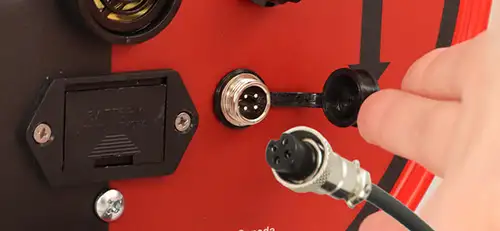
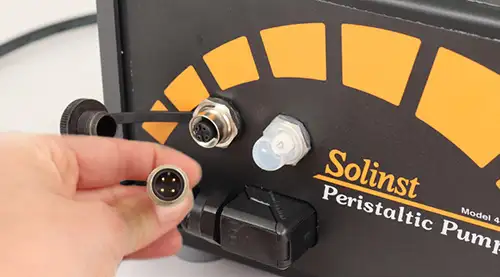
- Unthread the dust caps from the DrawDown Link Cable connections on the 101D Water Level DrawDown Meter and the 410 Peristaltic Pump.
- To connect the DrawDown Link Cable Assembly, line up the sockets and pins of the connections. Gently push the cable connector into the connection and twist slightly until you feel/ hear a small click, indicating that proper alignment has been made.
- Only tighten the metal couplings while holding the cable still. Tighten the couplings until they seat. It does not matter which end of the cable is connected first.
- Connect the pump to the battery, connecting the red (positive) clip last.
- Make sure the 101D switch is in the Water Level Mode position, then turn the 410 Pump and 101D ON using their dials.
- With the probe in the air, switch the 101D to Draw Down Mode. This will activate the 101D buzzer and light.
- The pump should turn OFF, and the LED indicator on the pump should go from solid blue to flashing blue.
- Switch the 101D back to Water Level Mode. The buzzer and light should stop and the pump should start back up with a solid blue LED.
Operation:
- With the proper connections made and the equipment checks done, turn the 101D Water Level DrawDown Meter ON and put it in Water Level Mode. Lower the probe to the desired drawdown depth.
- Once you have submerged the probe at the desired depth, switch to DrawDown Mode. The light and buzzer will shut off.
- Lower the 410 Peristaltic Pump tubing to the desired sampling depth then turn the pump ON and adjust the flow as desired.
- When conducting your pumping/sampling application, the 101D Water Level DrawDown Meter light and buzzer will activate if the probe exits the water, and the pump will stop until the water level has recovered and the 101D Water Level DrawDown Meter probe is again submerged.
Related Products
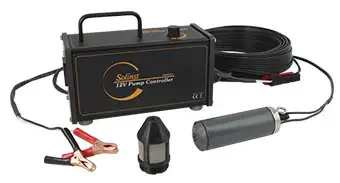
415 12V Submersible Pump
The Solinst 12V Submersible Pump provides an efficient means of purging and obtaining groundwater samples from 2" OD monitoring wells. The compact pump can sample from depths of 36.5 m (120 ft) below ground surface, and is easy to adjust the flow rates up to 13.5 L/min (3.6 US gpm) in shallower applications.
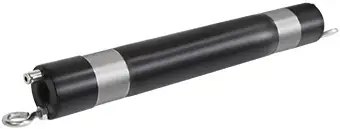
800M Mini Packer
The 800M Mini Packer is 1 ft in length and is designed to fit in nominal 2" OD monitoring wells to temporarily isolate discrete zones for groundwater monitoring and sampling applications – available as a single and straddle packer setup.
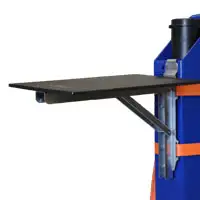
Make Your Life Easier In The Field
Consider making your life easier in the field by ordering one of our convenient Field Tables. We have two models available, Well-mount and Stand-alone, to keep your equipment organized and provide a clean, sturdy surface to hold your field tools.
Well-mount Field Table - 115209
Stand-alone Field Table - 115312


