

To connect the WLTS to the Current Loop Adaptor, it must first be connected to the Communication/Vented Cable (see Section 1.4.1), then the Communication/Vented Cable is connected to the WLTS Current Loop Adaptor.
- ) To connect the Cable to the Adaptor, first, unscrew and remove the compression fitting nut from the Adaptor.
- Use a Phillips screwdriver to remove the four screws and remove the cover of the Adaptor.
- Thread the wire leads (and vent tube) of the Cable through the compression fitting nut, then thread them one by one through the opening in the Adaptor. Here are some tips to follow:
- Thread the wires into the Adaptor one at a time using tweezers as needed to guide each wire.
- While pushing one wire through the Adaptor opening, keep the remaining wires well away from the opening so that they don't snag.
- Hold the wire bundle about 1" (25 mm) from the ferrule pin as you insert the wires through the opening. This helps prevent bending and allows the wires to pass through smoothly.
- For Vented Cables, cut the vent tube so that approximately 1.5" (38 mm) remains. Do not install the Gore filter. Push the vent tube through the opening until it sits under the PCB.
- Attach the wire leads to the push connect fittings of the WLTS terminals on the circuit board of the Adaptor. See the wiring diagram for the correct wire connections.
- Pull the Cable so the start of the orange jacketed portion is in the opening in the Adaptor.
- Slide the compression fitting nut up the Cable and tighten it back onto the Adaptor and Cable.
- Use the four screws to reconnect the cover of the Adaptor.
Note:
If configuring the WLTS, then the cover can be left off for access to the USB-A Programming Cable connector.
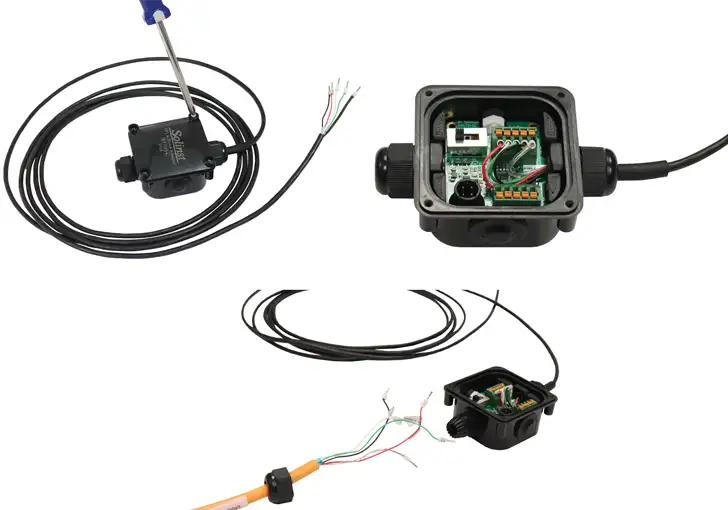
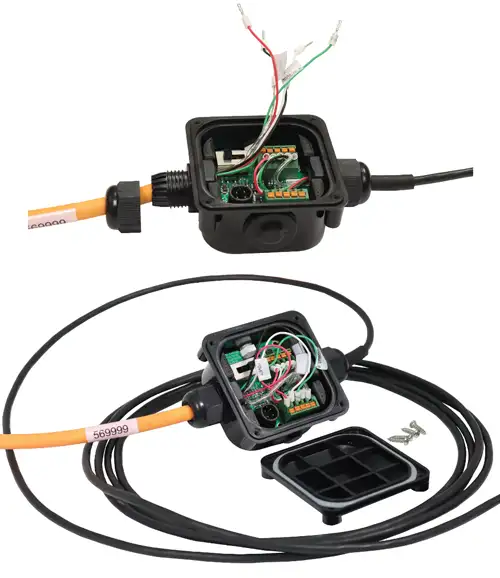
Figure 1-5 Connecting to the WLTS Current Loop Adaptor
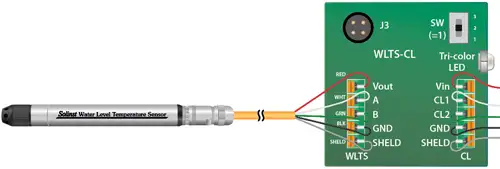
Figure 1-6 WLTS Wiring Connection to WLTS Current Loop Adaptor